
国庆、新年、圣诞节日头像框微信小程序换头像源码摘要:,此源码提供了一套完整的微信小程序头像更换功能,包括节日头像框设计、流量主广告展示等,源码支持用户自定义头像,同时具备流量主广告功能,可吸引更多用户访问和转化,该摘要旨在提供关于该源码的基本信息,帮助用户快速了解其功能和特点。,为了迎接国庆、新年和圣诞节日的到来,一款微信小程序换头像源码提供了丰富的功能和设计元素,该源码集成了节日头像框设计、流量主广告展示等功能,旨在为用户提供便捷、美观的换头像体验,用户可以根据自己的需求进行个性化定制,同时具备流量主广告功能,可吸引更多用户访问和转化,该源码具有高度的灵活性和扩展性,适用于各种微信小程序应用场景。
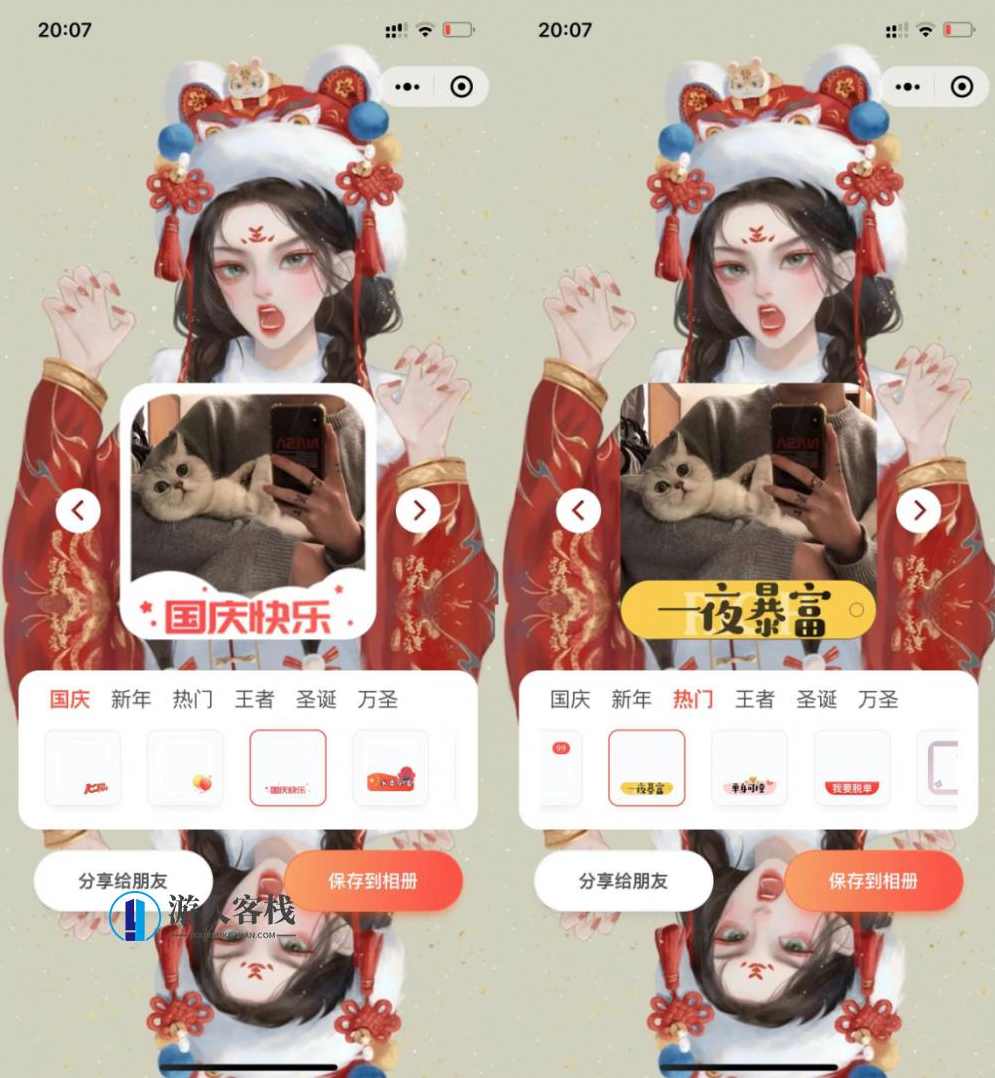
我经常在网上看到很多微信小程序更换头像,比如国庆、圣诞节等节日头像框。一键更换头像。其实原理很简单。您授权微信小程序登录后,它将获取您的原始头像。选择后,国旗等头像将与您授权获取的头像合并,生成新的头像,并可保存和下载。
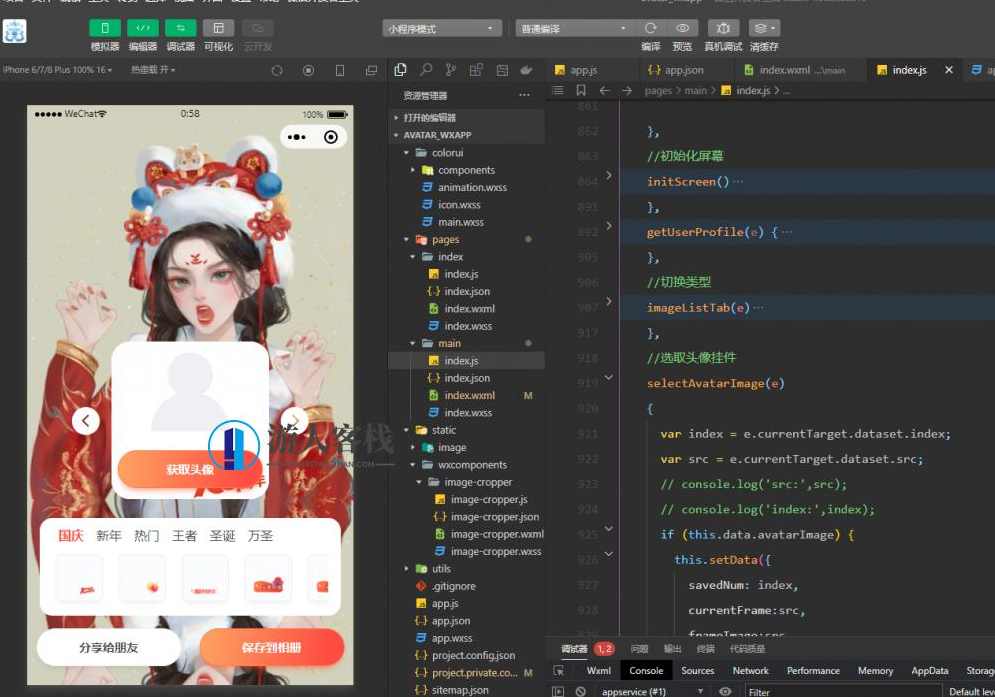
国庆、新年、圣诞节头像框小程序源码给主广告带来流量。它增加了很多材料。如果您不喜欢这些材料,您可以自行更改。它使用ColorUI小程序框架,没有后台。
这个源码是uniapp破解了很多被打包、乱码的代码的结果。已经被站长重写了,使用源码重写生成JS。
其主要功能及逻辑:
授权获取微信头像
头像帧分类和帧图像。所有帧图像必须放置在远程服务器上。如果图片太大,小程序将不允许。
选择切换头像功能,
小程序canvas生成图片

XML源码:
<view class="wrapper">
    <view class="container">
        <image class="page-bg _img" mode="widthFix" src="{{bgImage}}"></image>
        <view class="avatar-container" style="{{'margin-top:'+(showHeight+'px')+';'}}" id="avatar-container">
        <!-- 屏蔽上传iocn -->
            <!-- <block wx:if="{{avatarImage}}">
                <view class="xiangji-icon"><label data-event-opts="{{[['tap',[['chooseImage',['$event']]]]]}}" class="iconfont iconxiangji2 _span" bindtap="__e"></label></view>
            </block> -->
            <image class="avatar-img _img" id="avatar-img" src="{{avatarImage}}"></image>
            <block wx:if="{{currentFrame}}">
                <image class="avatar-frame _img" src="{{frameImage}}"></image>
            </block>
            <block wx:if="{{!avatarImage}}">
                <view class="empty-avatar-view">
                    <image class="empty-avatar _img" src="/static/image/avatar_empty.svg"></image>
                    <button class="cu-btn round action-btn btn-primary" id="btn-choose-img"  bindtap="getUserProfile">获取头像</button>
                </view>
            </block>
            <view class="prev _p" wx:if="{{!avatarImage}}" bindtap="getUserProfile"><label class="iconfont iconqianfanicon _span"></label></view>
            <view class="next _p" wx:if="{{!avatarImage}}" bindtap="getUserProfile"><label class="iconfont iconhoufanicon _span"></label></view>

            <view class="prev _p" wx:if="{{avatarImage}}" data-type="pre" bindtap="cutover"><label class="iconfont iconqianfanicon _span"></label></view>
            <view class="next _p" wx:if="{{avatarImage}}" data-type="next"  bindtap="cutover"><label class="iconfont iconhoufanicon _span"></label></view>
        </view>
        <view class="_div"><canvas class="canvas" canvasId="canvas"></canvas></view>
        <view class="panel assets-container">
            <view style="display:flex;" clss="category-list" class="_div">
                <block wx:for="{{categoryList}}" wx:for-item="item" wx:for-index="index" wx:key="index">
                    <view class="_div"><text class="{{['category ',item.id===currentCategory?'active':'']}}" data-categroy-id="{{item.id}}" bindtap="imageListTab">{{item.name}}</text></view>
                </block>
            </view>
            <scroll-view class="assets-scroll-view" scroll-into-view="{{bottomId}}" scrollX="true">
                <block wx:for="{{imageList}}" wx:for-item="item" wx:for-index="index" wx:key="index">
                    <view class="{{['assets','_div',index===savedNum&&avatarImage?'active-border':'']}}" id="{{'img'+index}}">
                        <image src="{{item.src}}" data-index="{{index}}" data-src="{{item.src}}"  bindtap="selectAvatarImage" class="_img"></image>
                    </view>
                </block>
            </scroll-view>
        </view>
        <view class="flex justify-around">
        <button class="cu-btn round action-btn" openType="share" id="btn-choose-img"  bindtap="share">分享给朋友</button>
        <button class="cu-btn round action-btn btn-primary" id="btn-save" bindtap="saveCans">保存到相册</button></view>
        <view class="ad-container">
            <view binderror="__e" bindload="__e" unitId="adunit-43f7c4189a8e7c35" class="_div"></view>
        </view>
    </view>
</view>
JS代码:
// pages/main/index.js

Page({

    /**
     * 页面的初始数据
     */
    data: {
        bgImage: "/static/image/bg_image.jpg",
        title: ["快来制作2022新年头像框", "您收到一个好看的头像请注意查收", "您有个新年头像待查收", "2022专属王者头像框"],
        showHeight: 220,
        avatarUrl: "",
        subscribe: true,
        savedNum: 0,
        cansWidth: 280,
        cansHeight: 280,
        avatarImage: "",
        userInfo: '',
        currentFrame: {}, //目前选取的头像框
        frameImage: '', //选中的头像框
        bottomId: null,
        currentCategory: "guoqing",
        categoryList: [{
            id: "guoqing",
            name: "国庆"
        }, {
            id: "years",
            name: "新年"
        }, {
            id: "hot",
            name: "热门",
        }, {
            id: "wangzhe",
            name: "王者",
        }, {
            id: "shengdan",
            name: "圣诞",
        }, {
            id: "wansheng",
            name: "万圣",
        }], //头像分类
        imageList: [],
        assetsList: {
        //头像背景框需要放在远程服务器
            guoqing: [{
                src: "/static/touxiangkuang/guoqing/1.png"
            }, {
                src: "/static/touxiangkuang/guoqing/2.png"
             {
                src: "/static/touxiangkuang/xinnian/93.png"
            }],
        }
    },

    /**
     * 生命周期函数--监听页面加载
     */
    onLoad(options) {
        this.initScreen()
    },

    /**
     * 生命周期函数--监听页面初次渲染完成
     */
    onReady() {

    },

    /**
     * 生命周期函数--监听页面显示
     */
    onShow() {

    },

    /**
     * 生命周期函数--监听页面隐藏
     */
    onHide() {

    },

    /**
     * 生命周期函数--监听页面卸载
     */
    onUnload() {

    },

    /**
     * 页面相关事件处理函数--监听用户下拉动作
     */
    onPullDownRefresh() {

    },

    /**
     * 页面上拉触底事件的处理函数
     */
    onReachBottom() {

    },

    /**
     * 用户点击右上角分享
     */
    onShareAppMessage() {

    },
    //初始化屏幕
    initScreen() {
        var that = this;
        wx.getSystemInfo({
            success(res) {
                var height = res.windowHeight;
                var showHeight = 220;
                if (height > 900) {
                    showHeight = 340;
                } else if (height > 850) {
                    showHeight = 330;
                } else if (height > 700) {
                    showHeight = 300;
                } else if (height > 600) {
                    showHeight = 240;
                } else {
                    showHeight = 140;
                }
                that.setData({
                    showHeight: showHeight
                })
            }
        });

        this.setData({
            imageList: this.data.assetsList[this.data.currentCategory],
            frameImage: this.data.assetsList[this.data.currentCategory][0].src
        })

    },
    getUserProfile(e) {
        // 推荐使用 wx.getUserProfile 获取用户信息,开发者每次通过该接口获取用户个人信息均需用户确认
        // 开发者妥善保管用户快速填写的头像昵称,避免重复弹窗
        wx.getUserProfile({
            desc: '用于完善会员资料', // 声明获取用户个人信息后的用途,后续会展示在弹窗中,请谨慎填写
            success: (res) => {
                //console.log('res:',res);
                this.setData({
                    userInfo: res.userInfo,
                    avatarImage: res.userInfo.avatarUrl
                })
            }
        })
    },
    //切换类型
    imageListTab(e) {
        var categroyId = e.currentTarget.dataset.categroyId
        this.setData({
            currentCategory: categroyId,
            imageList: this.data.assetsList[categroyId],
            savedNum: 0
        })
        this.changeAsset(this.data.assetsList[categroyId], 0);

    },
    //选取头像挂件
    selectAvatarImage(e) {
        var index = e.currentTarget.dataset.index;
        var src = e.currentTarget.dataset.src;
        // console.log('src:',src);
        // console.log('index:',index);
        if (this.data.avatarImage) {
            this.setData({
                savedNum: index,
                currentFrame: src,
                frameImage: src
            })
        } else {
            wx.showToast({
                title: "请先上传图片",
                icon: "none",
                duration: 2000
            });
        }
    },
    // 左右切换
    cutover(e) {
        var type = e.currentTarget.dataset.type
        if (!this.data.avatarImage) {
            wx.showToast({
                title: "请先上传图片",
                icon: "none",
                duration: 2000
            });
            return;
        }

        if (type == 'next') {
            if (this.data.savedNum < this.data.imageList.length - 1) {

                this.setData({
                    savedNum: this.data.savedNum + 1,
                    frameImage: this.data.imageList[this.data.savedNum].src,
                    bottomId: "img" + this.data.savedNum
                })
            } else {
                wx.showToast({
                    title: "已经是最后一张",
                    icon: "none",
                    duration: 2000
                });
            }
        } else {
            if (this.data.savedNum) {
                this.data.savedNum -= 1;
                this.data.currentFrame = this.data.imageList[this.data.savedNum];
                this.data.bottomId = "img" + this.data.savedNum;
            } else {
                wx.showToast({
                    title: "已经是第一张",
                    icon: "none",
                    duration: 2000
                });
            }
        }
    },
    // 选择挂件
    changeAsset(data, index) {
        if (this.data.avatarImage) {
            this.data.savedNum = index;
            this.data.currentFrame = data[index];
        } else {
            wx.showToast({
                title: "请先上传图片",
                icon: "none",
                duration: 2000
            });
        }
    },
    draw() {
        console.log("绘制头像");
        var a = this;

        if (a.avatarImage) {
            var t = wx.createSelectorQuery();
            t.select("#avatar-img").boundingClientRect();
            t.exec(function (t) {
                var r = wx.createCanvasContext("canvas");
                r.clearRect(0, 0, a.cansWidth, a.cansHeight);
                wx.getImageInfo({
                    src: a.avatarImage,
                    success: function success(res) {
                        r.drawImage(res.path, 0, 0, a.cansWidth, a.cansHeight);
                        wx.getImageInfo({
                            src: a.frameImage,
                            success: function success(res) {
                                r.drawImage(res.path, 0, 0, a.cansWidth, a.cansHeight);
                                r.draw();
                                setTimeout(function () {
                                    a.saveCans();
                                }, 100);
                            }
                        });
                    }
                });
            });
        } else {
            wx.showToast({
                title: "请先上传图片",
                icon: "none",
                duration: 2000
            });
        }
    },
    share() {
        wx.showShareMenu({
            withShareTicket: true,
            menus: ["shareAppMessage", "shareTimeline"]
        });
    },
    // 保存到相册
    saveCans() {

        // 获取结束
    },
    // 分享到朋友圈
    onShareTimeline() {
        return {
            title: this.title[(0, _random.random)(0, 4)],
            imageUrl: "api/toux/2.jpg",
            path: "/pages/main/index"
        };
    },
    // 页面分享
    onShareAppMessage() {
        return {
            title: this.title[(0, _random.random)(0, 4)],
            imageUrl: "/api/toux/1.jpg",
            path: "/pages/flag/guoqing/main"
        };
    },
    /**
     *  获取相册权限
     */
    wxSaveAuth() {
        return new Promise(function (resolve, reject) {
            wx.getSetting({
                success: function success(res) {
                    if (!res.authSetting['scope.writePhotosAlbum']) {
                        // 如果没有写入权限,则获取写入相册权限
                        wx.authorize({
                            scope: 'scope.writePhotosAlbum',
                            success: function success() {
                                resolve();
                            },
                            fail: function fail(err) {
                                reject(err); // 用户拒绝授权

                                wx.showModal({
                                    content: '检测到您没打开相册权限,是否去设置打开?',
                                    confirmText: '确认',
                                    cancelText: '取消',
                                    success: function success(res) {
                                        if (res.confirm) {
                                            wx.openSetting({
                                                success: function success(res) {}
                                            });
                                        }
                                    }
                                });
                            }
                        });
                    } else {
                        resolve();
                    }
                },
                fail: function fail(e) {
                    reject(e);
                }
            });
        });
    }


})
国庆新年圣诞节日头像框小程序源码
附件
国庆新年圣诞节日头像框微信小程序换头像源码源码带流量主广告
ZIP压缩包
百度网盘下载
下载文件

相关阅读:
1、21世纪最牛流量技术-超级泛解析站群引导流量日引50000IP(附带程序)
2、中国创盟云致富平台等全自动赚钱机器自动财富机最新版源码+视频(价值698元)
3、精品源码 微动力WQ_3.0804UTF商业版程序+最新微动力WQ_V3-20140813更新包完全免费下载
4、(网店商城) 轻APP微场景轻应用LightAPP专业版-wap手机网站制作-自定义场景模式 增强入口 聚合流量
5、高端黑帽SEO技术-利用蜘蛛劫持域名引流轻松获取百万流量的核心技术
6、《单页流量爆破系统及绝密推广》附源码思人学院高级VIP课程(价值888元)无水印版
1.仅限用于学习和研究目的;不得将上述内容用于商业或者非法用途,否则,一切后果请用户自负。我们非常重视版权问题,如有侵权请点击版权投诉。敬请谅解!
2.如遇下载链接失效、解压密码错误等问题请点击 提交工单
3.在下载源码前,请务必要仔细阅读并接受 购前/下载协议 购买即视为您同意该协议!
蓝星智库 » 国庆新年圣诞节日头像框微信小程序换头像源码源码带流量主广告,国庆新年圣诞节日头像框微信小程序换头像源码及流量主广告设计


