
微信小程序换头像,比如说新年,国庆节,圣诞节等一些节日的头像框,一键换头像,原理很直观,是微信小程序允许进站之后,获取你的完整头像,在你可以选择国旗等头像后和你许能获取头像分拆分解成两张新头像,contacts浏览。
其实你会发现,现在在网上时常看见许多微信小程序换头像的,比如说新年,国庆节,圣诞节等一些节日的头像框,一键换头像,原理很直观,是微信小程序允许进站之后,获取你的完整头像,在你可以选择国旗等头像后和你许能获取头像分拆分解成两张新头像,contacts浏览。
新年,国庆,圣诞节日头像框小程序源码带流量主广告,加了许多素材,素材也可以更换,使用ColorUI小程序框架,无后台。
此源码本是uniapp解开许多代码被装箱过乱码的,
其源码主要功能和逻辑:
登录能获取微信头像
头像边框分类及边框图,所有边框图要放到远程服务器,图片太大小程序不容许
可以选择转换头像功能,
小程序canvas分解成图片
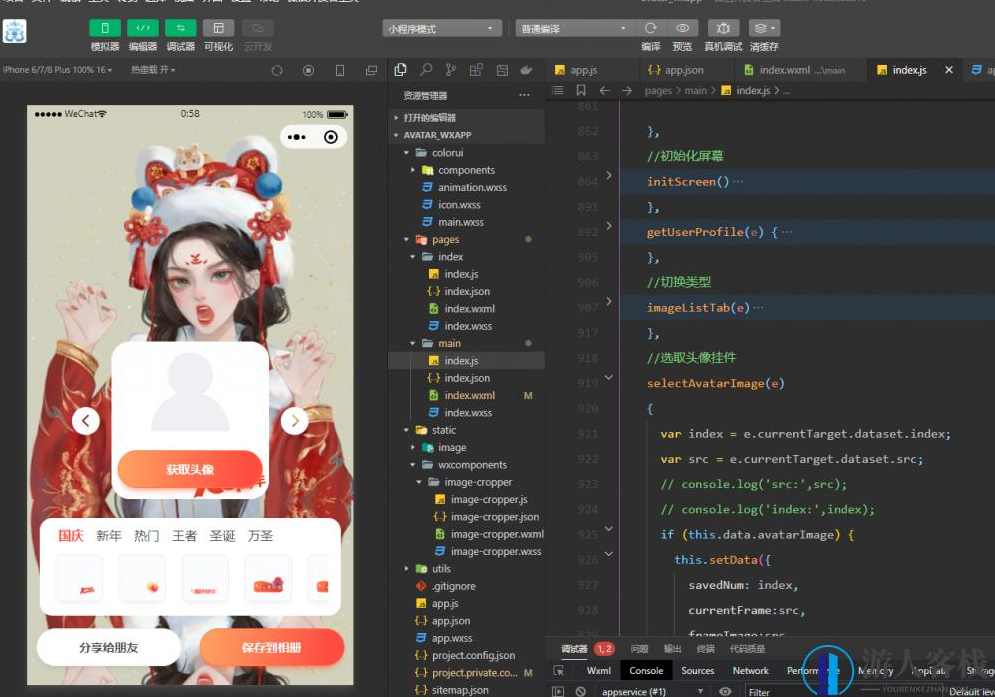
XML源码:
<view class="wrapper">    <view class="container">        <image class="page-bg _img" mode="widthFix" src="{{bgImage}}"></image>        <view class="avatar-container" style="{{'margin-top:'+(showHeight+'px')+';'}}" id="avatar-container">        <!-- 屏蔽上载iocn -->            <!-- <block wx:if="{{avatarImage}}">
                <view class="xiangji-icon"><label data-event-opts="{{[['tap',[['chooseImage',['$event']]]]]}}" class="iconfont iconxiangji2 _span" bindtap="__e"></label></view>
            </block> -->            <image class="avatar-img _img" id="avatar-img" src="{{avatarImage}}"></image>            <block wx:if="{{currentFrame}}">                <image class="avatar-frame _img" src="{{frameImage}}"></image>            </block>            <block wx:if="{{!avatarImage}}">                <view class="empty-avatar-view">                    <image class="empty-avatar _img" src="/static/image/avatar_empty.svg"></image>                    <button class="cu-btn round action-btn btn-primary" id="btn-choose-img"  bindtap="getUserProfile">以获取头像</button>                </view>            </block>            <view class="prev _p" wx:if="{{!avatarImage}}" bindtap="getUserProfile"><label class="iconfont iconqianfanicon _span"></label></view>            <view class="next _p" wx:if="{{!avatarImage}}" bindtap="getUserProfile"><label class="iconfont iconhoufanicon _span"></label></view>            <view class="prev _p" wx:if="{{avatarImage}}" data-type="pre" bindtap="cutover"><label class="iconfont iconqianfanicon _span"></label></view>            <view class="next _p" wx:if="{{avatarImage}}" data-type="next"  bindtap="cutover"><label class="iconfont iconhoufanicon _span"></label></view>        </view>        <view class="_div"><canvas class="canvas" canvasId="canvas"></canvas></view>        <view class="panel assets-container">            <view style="display:flex;" clss="category-list" class="_div">                <block wx:for="{{categoryList}}" wx:for-item="item" wx:for-index="index" wx:key="index">                    <view class="_div"><text class="{{['category ',item.id===currentCategory?'active':'']}}" data-categroy-id="{{item.id}}" bindtap="imageListTab">{{item.name}}</text></view>                </block>            </view>            <scroll-view class="assets-scroll-view" scroll-into-view="{{bottomId}}" scrollX="true">                <block wx:for="{{imageList}}" wx:for-item="item" wx:for-index="index" wx:key="index">                    <view class="{{['assets','_div',index===savedNum&&avatarImage?'active-border':'']}}" id="{{'img'+index}}">                        <image src="{{item.src}}" data-index="{{index}}" data-src="{{item.src}}"  bindtap="selectAvatarImage" class="_img"></image>                    </view>                </block>            </scroll-view>        </view>        <view class="flex justify-around">        <button class="cu-btn round action-btn" openType="share" id="btn-choose-img"  bindtap="share">互动给朋友</button>        <button class="cu-btn round action-btn btn-primary" id="btn-save" bindtap="saveCans">留存到书签</button></view>        <view class="ad-container">            <view binderror="__e" bindload="__e" unitId="adunit-43f7c4189a8e7c35" class="_div"></view>        </view>    </view></view>
JS代码:
// pages/main/index.jsPage({

    /**
     * 页面的alpha数据
     */    data: {
        bgImage: "/static/image/bg_image.jpg",
        title: ["快来制作2022新年头像框", "您接到一种漂亮的头像请注意记到", "您那个新年头像待记到", "2022专属王者头像框"],
        showHeight: 220,
        avatarUrl: "",
        subscribe: true,
        savedNum: 0,
        cansWidth: 280,
        cansHeight: 280,
        avatarImage: "",
        userInfo: '',
        currentFrame: {}, //目前挑选出的头像框        frameImage: '', //选中的头像框        bottomId: null,
        currentCategory: "guoqing",
        categoryList: [{
            id: "guoqing",
            name: "国庆"        }, {
            id: "years",
            name: "新年"        }, {
            id: "hot",
            name: "热门",
        }, {
            id: "wangzhe",
            name: "王者",
        }, {
            id: "shengdan",
            name: "圣诞",
        }, {
            id: "wansheng",
            name: "万圣",
        }], //头像分类        imageList: [],
        assetsList: {
        //头像背景框须要放到远程服务器            guoqing: [{
                src: "/static/touxiangkuang/guoqing/1.png"            }, {
                src: "/static/touxiangkuang/guoqing/2.png"             {
                src: "/static/touxiangkuang/xinnian/93.png"            }],
        }
    },

    /**
     * 生命周期函数--监听页面读取
     */    onLoad(options) {
        this.initScreen()
    },

    /**
     * 生命周期函数--监听页面首度图形顺利完成
     */    onReady() {

    },

    /**
     * 生命周期函数--监听页面表明
     */    onShow() {

    },

    /**
     * 生命周期函数--监听页面暗藏
     */    onHide() {

    },

    /**
     * 生命周期函数--监听页面装载
     */    onUnload() {

    },

    /**
     * 页面有关事件处理函数--监听用户下拉动作
     */    onPullDownRefresh() {

    },

    /**
     * 页面上拉触底事件的处理函数
     */    onReachBottom() {

    },

    /**
     * 用户点击右上角互动
     */    onShareAppMessage() {

    },
    //alpha化屏幕    initScreen() {
        var that = this;
        wx.getSystemInfo({
            success(res) {
                var height = res.windowHeight;
                var showHeight = 220;
                if (height > 900) {
                    showHeight = 340;
                } else if (height > 850) {
                    showHeight = 330;
                } else if (height > 700) {
                    showHeight = 300;
                } else if (height > 600) {
                    showHeight = 240;
                } else {
                    showHeight = 140;
                }
                that.setData({
                    showHeight: showHeight
                })
            }
        });

        this.setData({
            imageList: this.data.assetsList[this.data.currentCategory],
            frameImage: this.data.assetsList[this.data.currentCategory][0].src
        })

    },
    getUserProfile(e) {
        // 推荐使用 wx.getUserProfile 以获取用户信息,开发者每次通过该接口以获取用户个人信息均需用户确认        // 开发者妥善保管用户快速填写的头像昵称,避免重复弹窗        wx.getUserProfile({
            desc: '用于完善会员资料', // 声明以获取用户个人信息后的用途,后续会展示在弹窗中,请谨慎填写            success: (res) => {
                //console.log('res:',res);                this.setData({
                    userInfo: res.userInfo,
                    avatarImage: res.userInfo.avatarUrl
                })
            }
        })
    },
    //切换类型    imageListTab(e) {
        var categroyId = e.currentTarget.dataset.categroyId
        this.setData({
            currentCategory: categroyId,
            imageList: this.data.assetsList[categroyId],
            savedNum: 0        })
        this.changeAsset(this.data.assetsList[categroyId], 0);

    },
    //挑选出头像挂件    selectAvatarImage(e) {
        var index = e.currentTarget.dataset.index;
        var src = e.currentTarget.dataset.src;
        // console.log('src:',src);        // console.log('index:',index);        if (this.data.avatarImage) {
            this.setData({
                savedNum: index,
                currentFrame: src,
                frameImage: src
            })
        } else {
            wx.showToast({
                title: "请先上载图片",
                icon: "none",
                duration: 2000            });
        }
    },
    // 左右切换    cutover(e) {
        var type = e.currentTarget.dataset.type
        if (!this.data.avatarImage) {
            wx.showToast({
                title: "请先上载图片",
                icon: "none",
                duration: 2000            });
            return;
        }

        if (type == 'next') {
            if (this.data.savedNum < this.data.imageList.length - 1) {

                this.setData({
                    savedNum: this.data.savedNum + 1,
                    frameImage: this.data.imageList[this.data.savedNum].src,
                    bottomId: "img" + this.data.savedNum
                })
            } else {
                wx.showToast({
                    title: "已经是最后一张",
                    icon: "none",
                    duration: 2000                });
            }
        } else {
            if (this.data.savedNum) {
                this.data.savedNum -= 1;
                this.data.currentFrame = this.data.imageList[this.data.savedNum];
                this.data.bottomId = "img" + this.data.savedNum;
            } else {
                wx.showToast({
                    title: "已经是第一张",
                    icon: "none",
                    duration: 2000                });
            }
        }
    },
    // 选择挂件    changeAsset(data, index) {
        if (this.data.avatarImage) {
            this.data.savedNum = index;
            this.data.currentFrame = data[index];
        } else {
            wx.showToast({
                title: "请先上载图片",
                icon: "none",
                duration: 2000            });
        }
    },
    draw() {
        console.log("绘制头像");
        var a = this;

        if (a.avatarImage) {
            var t = wx.createSelectorQuery();
            t.select("#avatar-img").boundingClientRect();
            t.exec(function (t) {
                var r = wx.createCanvasContext("canvas");
                r.clearRect(0, 0, a.cansWidth, a.cansHeight);
                wx.getImageInfo({
                    src: a.avatarImage,
                    success: function success(res) {
                        r.drawImage(res.path, 0, 0, a.cansWidth, a.cansHeight);
                        wx.getImageInfo({
                            src: a.frameImage,
                            success: function success(res) {
                                r.drawImage(res.path, 0, 0, a.cansWidth, a.cansHeight);
                                r.draw();
                                setTimeout(function () {
                                    a.saveCans();
                                }, 100);
                            }
                        });
                    }
                });
            });
        } else {
            wx.showToast({
                title: "请先上载图片",
                icon: "none",
                duration: 2000            });
        }
    },
    share() {
        wx.showShareMenu({
            withShareTicket: true,
            menus: ["shareAppMessage", "shareTimeline"]
        });
    },
    // 留存到书签    saveCans() {

        // 以获取结束    },
    // 互动到朋友圈    onShareTimeline() {
        return {
            title: this.title[(0, _random.random)(0, 4)],
            imageUrl: "api/toux/2.jpg",
            path: "/pages/main/index"        };
    },
    // 页面互动    onShareAppMessage() {
        return {
            title: this.title[(0, _random.random)(0, 4)],
            imageUrl: "/api/toux/1.jpg",
            path: "/pages/flag/guoqing/main"        };
    },
    /**
     *  以获取书签权限
     */    wxSaveAuth() {
        return new Promise(function (resolve, reject) {
            wx.getSetting({
                success: function success(res) {
                    if (!res.authSetting['scope.writePhotosAlbum']) {
                        // 如果没有写入权限,则以获取写入书签权限                        wx.authorize({
                            scope: 'scope.writePhotosAlbum',
                            success: function success() {
                                resolve();
                            },
                            fail: function fail(err) {
                                reject(err); // 用户拒绝授权                                wx.showModal({
                                    content: '检测到您没打开书签权限,是否去设置打开?',
                                    confirmText: '确认',
                                    cancelText: '取消',
                                    success: function success(res) {
                                        if (res.confirm) {
                                            wx.openSetting({
                                                success: function success(res) {}
                                            });
                                        }
                                    }
                                });
                            }
                        });
                    } else {
                        resolve();
                    }
                },
                fail: function fail(e) {
                    reject(e);
                }
            });
        });
    }


})
附件
换头像源码-修复版ayu.rar
71.3M
rar
百度云
下载文件

1.仅限用于学习和研究目的;不得将上述内容用于商业或者非法用途,否则,一切后果请用户自负。我们非常重视版权问题,如有侵权请点击版权投诉。敬请谅解!
2.如遇下载链接失效、解压密码错误等问题请点击 提交工单
3.在下载源码前,请务必要仔细阅读并接受 购前/下载协议 购买即视为您同意该协议!
蓝星智库 » 新年国庆圣诞节日头像框微信小程序源码 换头像小程序源码


